How eInvoicing Works
Imagine if supplier bills landed in your accounting system automatically, with fewer errors and less manual data entry. What if your customers could process your invoices faster too? eInvoicing can help small businesses save time, reduce administration, and improve cashflow by sending invoice data directly between accounting systems.
What is eInvoicing?
eInvoicing allows the transfer of invoice information between suppliers and business customers directly through their software, even when both parties are using different software platforms.[i] Whether you use Xero, MYOB Business or some other compliant software, your invoices follow a standardised protocol called PEPPOL, so they can be sent and received without emailing or printing.
eInvoicing is approved by IRD, meeting its standards for taxable supply information when preparing GST returns.[ii]
What is PEPPOL?
PEPPOL stands for Pan-European Public Procurement Online. It is an international framework that allows invoice information to move securely between different accounting systems. In New Zealand, it supports eInvoicing by setting common rules for how invoice data is sent, received and recognised.
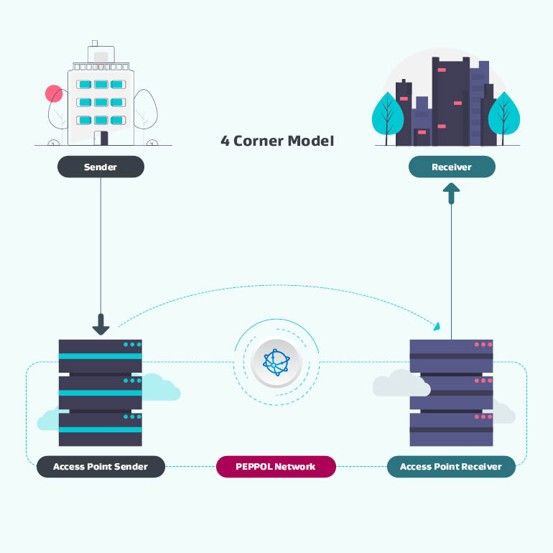
Network – eInvoices move through a four-corner model: the sender, the sender’s access point, the receiver’s access point and the receiver (Figure 1). In practice, the access points are usually the software providers that connect each business to the PEPPOL network.
Governance – transport infrastructure agreements. Ministry of Business, Innovation and Employment (MBIE) is the authority in New Zealand.
Document specifications – sets out what information is passed and what format it takes.
Why should small businesses use eInvoicing?
Suits any sized business
You don’t need to be a corporate to use eInvoicing. As long as you have a New Zealand Business Number and you send and receive invoices using accounting software, you can benefit from eInvoicing.
Universal connection
You don’t have to use the same accounting software as your supplier or customer. It can even cross international borders.
Fast and smooth delivery of invoices
You don’t need to print or email invoices, so the process is smoother. You’ll save processing time, printing costs and postage. You also avoid delays caused by waiting for post, checking the letterbox or clearing an accounts inbox.
Less data entry
When you receive eInvoices as draft bills, you only need to enter the account code and approve for payment. All of the other invoice detail is already shown in the eInvoice. You don’t need to scan invoices or save PDF documents.
All the detail of the eInvoice is shown in your ledger, so you will have fewer queries at period end or year end from your chartered accountant and bookkeeper.
Improved accuracy and security
There are fewer opportunities for data errors with eInvoicing, because the information sent by the supplier is an exact match with the customer version.
Data is sent securely with encryption and digital signature. There is less risk of invoice tampering via email. IRD doesn’t see the eInvoice transactions.
Faster customer payment
If it takes less time for your customer to process your invoice, they may be inclined to pay you faster, improving your cashflow. It’s harder for customers to argue they haven’t received your invoice! You can track the status of your invoices and payments from your software. You have better financial visibility overall.
What should we watch for when eInvoicing?
Duplicate invoices
If your supplier sends you an einvoice and a paper or PDF version of the same invoice, you may accidentally process the same invoice twice. Some accounting software alerts you when an invoice appears to be duplicated, but not all systems do.
Draft bills not processed
We’ve seen lots of accounting ledgers where bills are left in draft at month end. Make it a regular practice to review your draft bills and approve them.
Approving bills for payment
If you used to collect paper bills in a folder, then give your bookkeeper the bills you approve for payment, you’ll need to change your approval process around. Instead of signing each paper bill, you’ll need to review bills in your software before approving them.
If your business uses purchase orders, check how your accounting software matches eInvoices to approved purchase orders before you switch suppliers over. Make sure the supplier includes your purchase order number on the eInvoice, and decide who will review any exceptions where the order, goods received and invoice do not match. This keeps eInvoicing aligned with your existing approval controls rather than bypassing them.
Too Detailed information
Some suppliers may send invoices with every line item and description included. While this can improve transparency, it can also make invoices harder to review and may clutter your accounting system with more detail than you need.
A practical workaround is to agree with key suppliers on the level of detail required. For example, ask them to send a summary invoice through the eInvoicing network and provide the detailed breakdown as a separate PDF attachment or supporting document when needed.
How do I set up eInvoicing?
Before you turn eInvoicing on, it is worth doing a quick process check: confirm your NZBN, update supplier and customer records, decide who reviews draft bills, document your approval process, and test eInvoicing with one or two regular suppliers first. A small trial helps you identify coding, approval or duplicate-invoice issues before rolling it out more widely.
Find your New Zealand Business Number (NZBN)
Your New Zealand Business Number (NZBN) is vital for eInvoicing to work. It is a unique identifier to make sure the eInvoice is delivered to the right buyer.
If you operate through a company, limited partnership or incorporated society, you can search for your organisation in the appropriate Register and your NZBN will be listed there.
If you’re a sole trader, partnership or trust, you can search the NZBN Register or apply for an NZBN[iii]. If you previously applied for a Covid subsidy (CSP or RSP) you may already have an NZBN.
Check if your software is eInvoicing ready
If you’re on a Xero business plan (Ignite, Grow, Comprehensive, Ultimate) your software is ready. Go into Purchases – Bills, then click the link [Set up eInvoicing], [Manage]. You will be prompted to enter your registered business name and New Zealand business number.
If you use MYOB Business or access MYOB AccoutnRight online you can register to use eInvoicing. Click setting menus, choose Sales settings. Click the E-invoicing tab, then click [Get Started]. You will be prompted to enter your registered business name and New Zealand business number, town or city and post code.
Let your regular suppliers know
Contact your regular suppliers to let them know you’re ready to accept eInvoices from them. Provide them with your NZBN so they don’t need to look it up. Start with one or two suppliers so you can test your processes before adding others.
How do I check if suppliers or customers use eInvoicing?
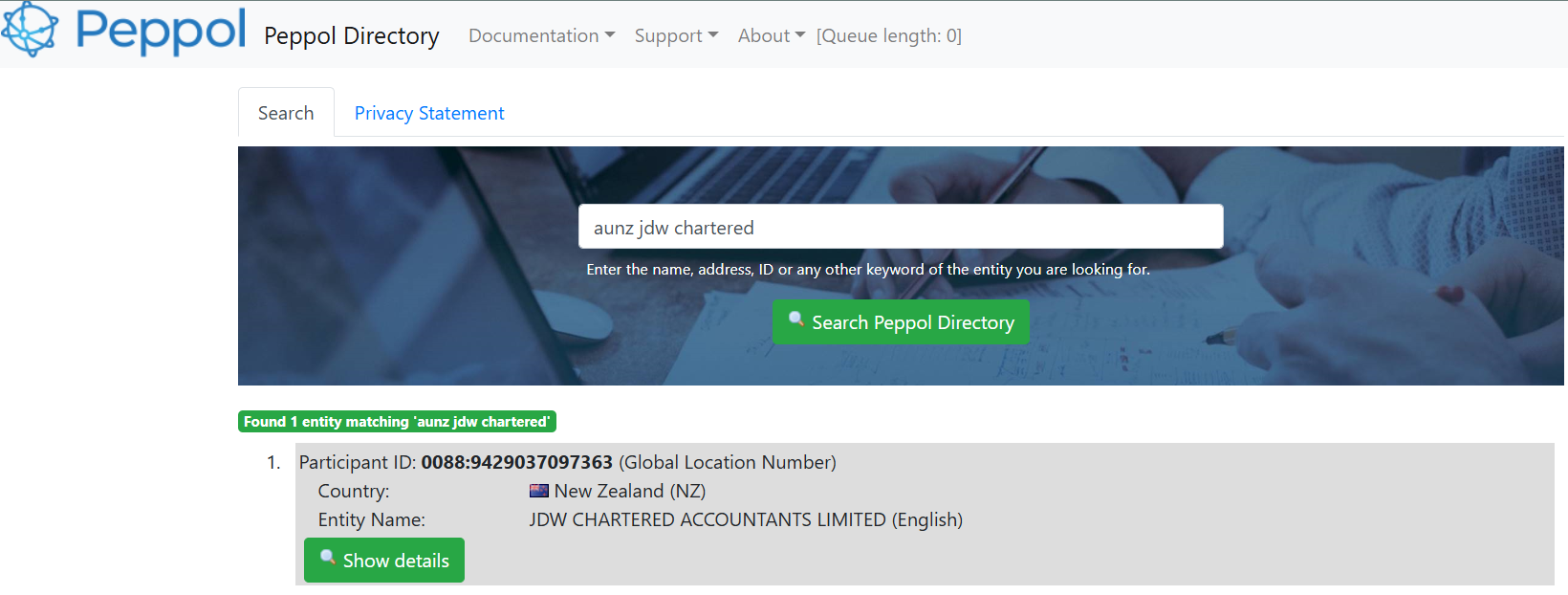
You can find out if your customers or suppliers are set up for eInvoice by going to the PEPPOL Directory. In the Search bar, type AUNZ [space] and their business name. Or if you want a list of all Australian and NZ businesses, type AUNZ and then download the resulting spreadsheet.
[i]
https://www.einvoicing.govt.nz/einvoicing/what-is-einvoicing
[ii] https://www.jdw.co.nz/gst-record-keeping-changes-2023
The Future of eInvoicing is Here
eInvoicing isn’t a future tech invention; eInvoicing automation is already used by large corporations and Government agencies, including Inland Revenue. As at the date of writing there were over 568,000 organisations in New Zealand and Australia using eInvoicing. If you have cloud accounting software, chances are, you already have access to eInvoicing. We’ve enabled eInvoicing in our accounting firm, because we can see the benefits of it for us and our clients.
If you’re unsure if eInvoicing is right for you, or you need assistance setting it up, then call us at JDW Chartered Accountants to discuss your options.
- Serena Irving
Serena Irving is a director in JDW Chartered Accountants Limited, Ellerslie, Auckland. JDW is a professional team of qualified accountants, business consultants, tax advisors, trust and business valuation specialists.
Download a PDF version here or contact the author by email . Like our Facebook page for regular tips.
An article like this, which is general in nature, is no substitute for specific accounting and tax advice. If you want more information about the issues in this article, please contact your adviser or the author.